

A homeowner with a leaking roof or a half-formed plan for a new kitchen does the same thing first. They search, tap a few results, and judge each business in seconds.
Your website is often the first handshake. If it loads slowly, hides your phone number, or looks like it was built in 2009, the visitor is gone before you ever hear about the job.
Good contractor website design isn’t about animation or clever tricks. It answers three questions fast: what do you do, where do you work, and how do I reach you?
This guide covers the pages you need, the layout choices that build trust, mobile and speed basics, photos and reviews, local search, what building a site involves, and the mistakes that quietly lose jobs. It’s written for owners of small and mid-size trades businesses, from solo handymen to full remodeling crews.
What a Contractor Website Actually Has to Do
A contractor site is not a brochure. It has one job: turn a stranger into a phone call or a quote request.
That job breaks into three smaller ones.
Be found. People need to reach you through search, maps, referrals,s or a link on a truck.
Build trust. Hiring a contractor means letting someone into your home or onto your property with real money at stake. Visitors look for proof you’re real, licensed,ed and good at the work.
Make contact easy. Every page should offer a clear next step, whether that’s calling, texting, or sending a form.
Effective contractor website design starts there. If a choice doesn’t help with one of those three, it’s decoration, so cut it or move it down the page.
Who Visits and What They Want
Different visitors arrive with different questions. Knowing them shapes every page.
| Visitor | What they want | Where to serve them |
|---|---|---|
| Homeowner with an urgent problem | A fast phone number and proof you’ll show up | Header call button, home page, service pages |
| Homeowner planning a big project | Examples, process, reviews and a sense of fit | Project gallery, about page, reviews |
| Property manager or commercial client | Licensing, insurance, references, capacity | About page, credentials, case studies |
| Prospective employee or subcontractor | What the company is like and how to apply | A short careers or contact section |
| Supplier or inspector | Business details and contacts | Footer and contact page |
Most of your revenue comes from the first two rows. Design for them first and add the rest quietly.
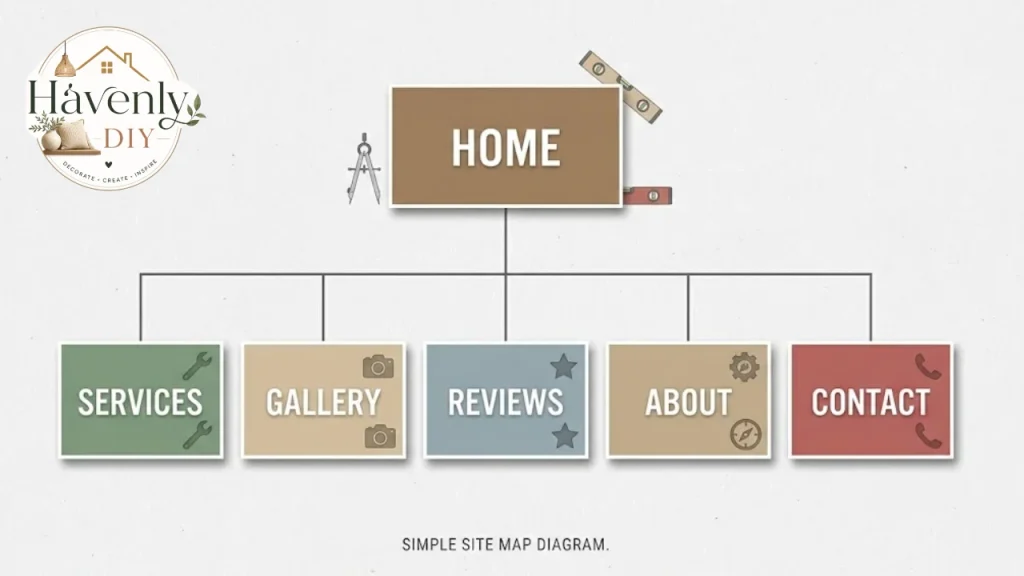
The Pages Every Contractor Site Needs
You don’t need fifty pages. You need the right ten, each with a clear purpose.
Home Page
The home page should say what you do and where, on the first screen. Something like “Kitchen and bath remodeling in [your city]” beats “Welcome to our website.”
Put your phone number, a main button, and one strong photo above the fold. Below that, show your top services, a few reviews,s and a short reason to choose you.
Services Pages
Give each major service its own page, not a bullet list on one page. A roofer might have separate pages for repairs, replacement,nt and storm damage, while a remodeler splits kitchens, baths, and additions.
This helps visitors, who can find exactly what they need. It also helps search engines, which match specific pages to specific searches.
Think about how homeowners describe the work. Our guides on home additions and modern kitchen cabinets show the terms people use when they start planning, and those terms belong on your service pages.
Service Area Page
Name the cities, counties, and neighborhoods you serve, and be honest about the edges. If you won’t drive two hours, say so.
This page quietly does a lot of work for local search, and it saves you from quoting jobs you’d never take.
Project Gallery
This is where most homeowners decide. Show finished work with before-and-after photos, a one-line description,n and the city or neighborhood.
Group projects by type so a visitor planning a bathroom doesn’t have to scroll past roofs. If you do ranch-style home renovations, a labeled set of those jobs helps owners of similar houses picture the result.
About Page
People hire people. Show the owner, the crew,ew and the story, even if it’s two short paragraphs.
Include years in business, trade affiliations, and what you’re proud of. A real photo of the team on a job site beats any stock image.
Reviews and Testimonials
Collect reviews from real clients and display them with first names and the type of job. Link to your Google Business Profile or other review pages so visitors can verify them.
Never invent or edit a review. It’s dishonest, and it often breaks platform rules and consumer-protection laws.
Licensing and Insurance
State your license number where your jurisdiction requires it, along with insurance and any manufacturer certifications. Rules differ by state and trade, so check with your licensing board about what must appear on ads and websites.
A short “Licensed and insured” strip in the footer, plus a fuller page, covers most needs.
Contact and Quote Page
Offer a phone number, a short form, and, if you like, a text option. Keep the form to the essentials: name, phone, email, project type,e and a short description.
Every extra field lowers the number of people who finish it.
FAQ or Resources
A page of honest answers saves you hours of repeat calls. Cover timelines, payment terms, permits,ts and what happens on day one.
It also gives search engines more relevant content, which we’ll get to shortly.
Layout and Design Choices That Build Trust
Visitors form an opinion of your company in a few seconds, long before they read a word. Clean contractor website design signals that you run a tidy, reliable business.
Keep the First Screen Simple
The top of the page should carry five things: your name or logo, a short headline, a phone number, one button,ton and one good photo.
Skip sliders and auto-playing video. They slow the page, distract from the message, and are rarely used.
Make the Phone Number Impossible to Miss
Place it in the header on every page, and make it tappable on phones. If you take texts, say so.
Many urgent jobs are won by whoever answers first, so the number matters more than any other element on the page.
Use a Calm, Readable Style
Choose two fonts at most and a small color palette, ideally based on your logo and truck wraps. Use dark text on a light background with plenty of white space.
Contrast matters. Pale gray text on a white page looks stylish and is hard to read, especially outdoors on a phone.
Write Like a Person
Replace “We provide comprehensive solutions for all your construction needs” with “We build kitchens, baths,s and additions for families in [city].” Plain language sounds honest, and honest sounds hireable.
Short paragraphs, clear headings, and a few bullets help people skim.
Mobile First, Because Your Customers Are
Many homeowners search from a phone, often while standing in the room that needs work. Contractor website design that works only on a desktop loses those visitors.
Test your site on a real phone, not just a resized browser window. Check these basics:
Tap targets. Buttons and links should be big enough to hit with a thumb.
Click-to-call. The phone number should dial when tapped.
Readable text. No pinching or zooming to read a paragraph.
Short forms. Typing on a phone is slow, so ask for the minimum.
No pop-ups that block the screen. They frustrate visitors and can hurt search visibility.
Most modern website builders produce responsive layouts, but check each page anyway, especially galleries and tables.
Speed: The Quiet Deal-Breaker
A slow site loses people before they see anything. Big photos are usually the culprit.
Resize images before upload. A photo straight from a phone camera is far larger than a web page needs.
Use modern formats. WebP or well-compressed JPEG files load faster than raw images.
Load galleries lazily. Photos below the first screen can load as the visitor scrolls.
Limit plugins and widgets. Each chat box, tracker,r or slider adds weight.
Choose decent hosting. Bargain hosting can make even a light site feel slow.
Free tools such as Google PageSpeed Insights show where the delays come from and list fixes in plain language.
Photos: Show the Work, Not the Stock
Photos are the strongest persuasion on a contractor site, and they are also where many sites fail.
What to Shoot
Take before, during,ng and after shots of every job you’re proud of. Shoot in daylight, tidy the space, and keep the horizon straight.
Wide shots show the whole room. Close-ups show craftsmanship, such as tile lines, trim joints, and clean caulk.
What to Avoid
Skip generic stock photos of smiling people in hard hats. Visitors can spot them, and they suggest you have no real work to show.
Don’t publish a client’s home photos without permission, and avoid showing house numbers, license plates,s or personal items.
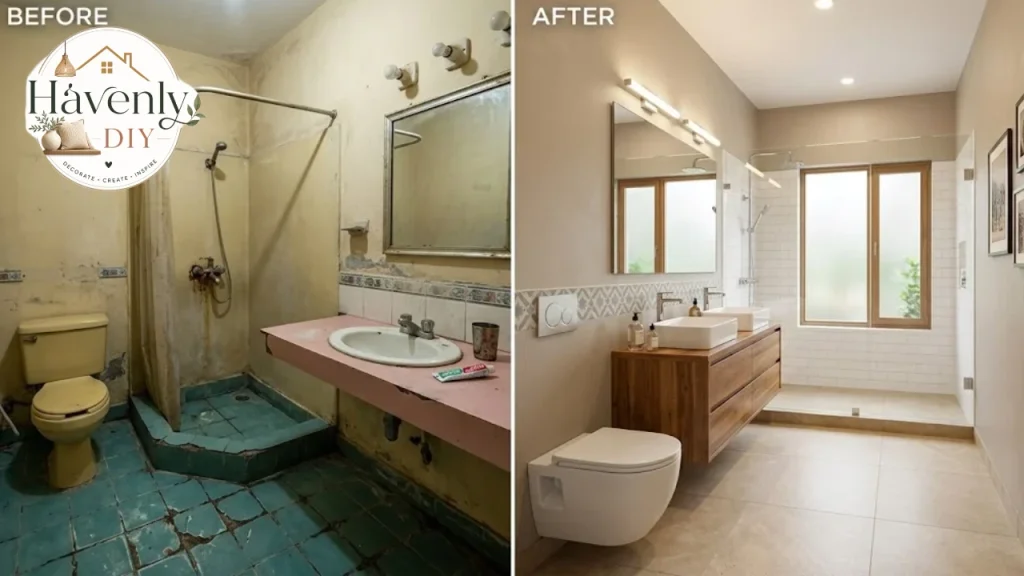
Bathroom and laundry jobs photograph well and match what homeowners search for. If you want to see the details people notice, our guides to a small bathroom vanity and laundry room cabinets are good examples of the language your captions can borrow.
Trust Signals That Actually Work
Trust is the product you’re selling before the first nail is driven. A site can build it with a handful of simple signals.
Real reviews. Show several, with names and job types, and link to the source.
License and insurance details. Put them where visitors can find them.
Years in business and local roots. “Family owned since [year] in [city]” says more than a slogan.
Warranty and guarantee terms. If you stand behind the work, say how.
Photos of your team and trucks. They prove you’re a real local business.
Affiliations. Trade associations, manufacturer certifications,ns and chamber of commerce memberships all help.
Clear process. A simple “how it works” section reduces fear of the unknown.
Only claim what’s true and current. An expired license or a certification you no longer hold can cause legal trouble.
A Simple Process Section
Visitors worry about what happens after they call. A short numbered process answers that.
- You contact us by phone, text,t email,t or form.
- We visit, listen,n and measure.
- You get a written estimate with scope and timeline.
- We agree on a contract, schedule, and payment terms.
- We build, keep you updated, and clean up daily.
- We walk the finished job with you and handle any punch-list items.
Adjust the steps to match how you really work.
Calls to Action: Tell People What to Do Next
A visitor who likes what they see still needs a nudge. Each page should end with a clear next step.
Use direct, specific wording. “Get a free estimate” or “Call for a site visit” works better than “Submit.”
Put calls to action in three places: the header, the middle of long pages,s and the footer. Repeat the phone number, but don’t turn the page into a wall of buttons.
Make sure forms work. Submit a test message every month and confirm it reaches the right inbox.
Local SEO Basics for Contractors
Most contractor work is local, so local search matters more than broad rankings. These basics are where to start.
Match Pages to Searches
Think about phrases like “kitchen remodeler in [city]” or “roof repair near me.” Each important service and city can have a page that answers that search clearly.
Write for people first. Stuffing a page with repeated phrases reads badly and doesn’t help.
Claim Your Google Business Profile
A complete, accurate profile with photos, hours, service areas, and reviews often brings in more calls than the website itself. Keep the name, address, and phone number consistent across directories.
Use Clear Titles and Headings
Each page needs a unique title and a short description that says what the page offers. Use headings in a logical order so both visitors and search engines can follow the page.
Publish Helpful Content
Answer the questions customers ask: how long a project takes, what permits are needed, what drives cost. A few good articles beat dozens of thin ones.
Results take time. Expect months, not days, and treat the site as a long-term asset.

Building the Site: DIY, Freelancer or Agency
There is no single right path to contractor website design. The best choice depends on your budget, your time, and how much the site needs to do.
| Option | Strengths | Trade-offs | Good fit |
|---|---|---|---|
| DIY with a site builder | Low upfront cost, full control, fast start | Takes your time, design quality varies | New or solo contractors with a small budget |
| Freelance designer | Personal service, custom look, flexible pricing | Quality and reliability vary widely | Established small firms wanting a polished site |
| Web agency | Strategy, design, writing and SEO in one team | Higher cost, longer timeline | Larger firms or competitive markets |
| Industry-specific template provider | Built for trades, quick launch | Less unique, may lock you into a platform | Contractors who want speed over uniqueness |
What Drives the Cost
Prices vary too much by region and scope for one number to be useful, and I could not verify current price ranges for this article. Treat any figure you see online as a rough guide and ask for itemized written quotes.
These factors move the price most:
Number of pages. A five-page site costs less than a forty-page one.
Custom design versus template. Custom layouts take more design time.
Copywriting. Professionally written service pages add cost but often convert better.
Photography and video. Professional shoots are an extra, though your own phone photos can be enough to start.
Features. Online booking, financing calculators, client portals,ls and quote tools all add work.
SEO work. Local content building can be one-off or monthly.
Ongoing support. Updates, security and backups can be included or billed separately.
Ongoing Costs to Budget For
A website is not a one-time purchase. Plan for these recurring items:
- Domain name renewal
- Hosting
- Security and backups
- Plugin or software licenses
- Content updates and new project photos
- Any marketing or SEO retainer
Ask each provider what’s included, who owns the domain and the content, and whether you can take the site elsewhere later.
Choosing a Platform
Most contractors choose between three types of platforms.
Hosted site builders. Drag-and-drop tools that include hosting. They’re simple and quick, though customization can be limited.
WordPress. Flexible and widely supported, with many themes and plugins. It needs regular updates and some technical care.
Trade-specific website services. Providers that build sites for contractors, often bundled with marketing. Check contract length and whether you own the site if you leave.
Whichever you choose, make sure you can edit text and add photos yourself, and that you control the domain name. Losing access to your own domain is a painful and avoidable mistake.
How to Hire a Web Designer Without Getting Burned
Hiring a designer is a lot like hiring a contractor. The same habits apply.
Look at their past work. Ask for links to live sites, ideally for local service businesses.
Talk to references. Ask about deadlines, communication,n and what happened after launch.
Get a written scope. It should list pages, features, revisions, timeline,ne and what you must supply.
Clarify ownership. You should own your domain, content, and photos.
Ask about support. Who fixes problems, and how fast?
Avoid big promises. Be wary of anyone who guarantees a number-one ranking.
Pay in stages. A deposit, a midpoint payment,t and a final payment tied to delivery protect both sides.
A Simple Plan for Your Build
Whether you do it yourself or hire help, a clear plan keeps the project moving.
Define the goal. Decide whether you want more calls, better-quality jobs, or both.
List your services and areas. Be specific.
Gather proof. Collect photos, reviews, license numbers, and certifications.
Sketch the pages. Use the page list earlier in this guide.
Write the copy. Draft plain-language text for each page.
Build or hire. Choose the route that fits your budget.
Test everything. Check forms, links, phone buttons, and mobile layouts.
Launch and connect. Link your Google Business Profile and social pages.
Review monthly. Check calls, form submissions,s and which pages visitors use.
A basic, honest site live this month beats a perfect one that never launches.
Launch Checklist
Run through this list before you go live.
- Phone number is in the header and tappable on mobile
- Every service page has its own title, headline,ne and call to action
- Service area is clearly stated
- License and insurance details are accurate
- Photos are real, resized, and have descriptive alt text
- Reviews are genuine and linked to their source
- Contact form sends to the right inbox and shows a thank-you message
- Site loads quickly on a phone connection
- Privacy policy and any required legal notices are in place
- Google Business Profile matches your site details
- Analytics or call tracking is set up
- You can log in and edit the site yourself
Common Mistakes to Avoid
Hiding the phone number. If visitors have to hunt for it, many won’t.
Using stock photos for everything. Real work builds more trust than polished strangers.
Writing for yourself. Trade jargon and long company histories bore visitors. Lead with what they get.
Ignoring mobile. A cramped layout on a phone costs you leads.
Skipping service and city pages. One vague page can’t compete with specific ones.
Letting the site go stale. Old projects, dead links,s and outdated offers hurt credibility.
Making the form too long. Ask only what you need to start the conversation.
Faking reviews or credentials. It’s dishonest and can bring legal and platform penalties.
Forgetting to track results. Without call tracking or analytics, you can’t tell what works.
Not owning the domain. Make sure the domain is registered in your name.
FAQs:
What makes a good contractor website?
A good contractor website design loads quickly, works on phones, and shows your phone number clearly. It also displays real project photos, genuine reviews, and your credentials, and makes the next step obvious.
How many pages does a contractor website need?
Most small contractors do well with five to ten pages: home, services, service area, projects, about, reviews, contact,t and a few helpful articles. Add more only when each has a clear purpose.
Do I need a blog?
Not necessarily. A few well-written articles answering common questions can help, but a neglected blog looks worse than none. Start with service pages and add articles when you have time to maintain them.
Should I build my own site or hire someone?
If your budget is tight and you’re comfortable with simple tools, a builder can be enough to start. If you want a polished look, strategy,gy and SEO help, a freelancer or agency may be worth it.
How long does it take to get found on Google?
It varies with competition, your location,ion and the work you put in. Expect months for steady results, and start with a complete Google Business Profile and clear service pages.
Is a Google Business Profile more important than a website?
They work together. The profile often appears first in local searches, and the website gives visitors the details and proof to decide. Keep both accurate and consistent.
How do I get more reviews?
Ask every happy customer at the end of the job, make it easy with a direct link, and respond to every review politely. Never pay for fake reviews or offer incentives that break platform rules.
What should I put in my photo gallery?
Real finished projects, with before-and-after shots where possible, grouped by type and labeled with the location. Get permission from clients and avoid personal details.